Best Outdoor Golf Launch Monitor 2026: Tested and Ranked
Golf practice has changed dramatically in the last decade. Modern sensors and mobile technology now allow players to measure shots with a level of precision that used to require professional training facilities. According to research from the United States Golf Association, accurate swing feedback significantly improves skill development because players can connect feel with measurable results. Another study published through the National Institutes of Health shows that real time performance feedback accelerates motor learning in sports training environments.
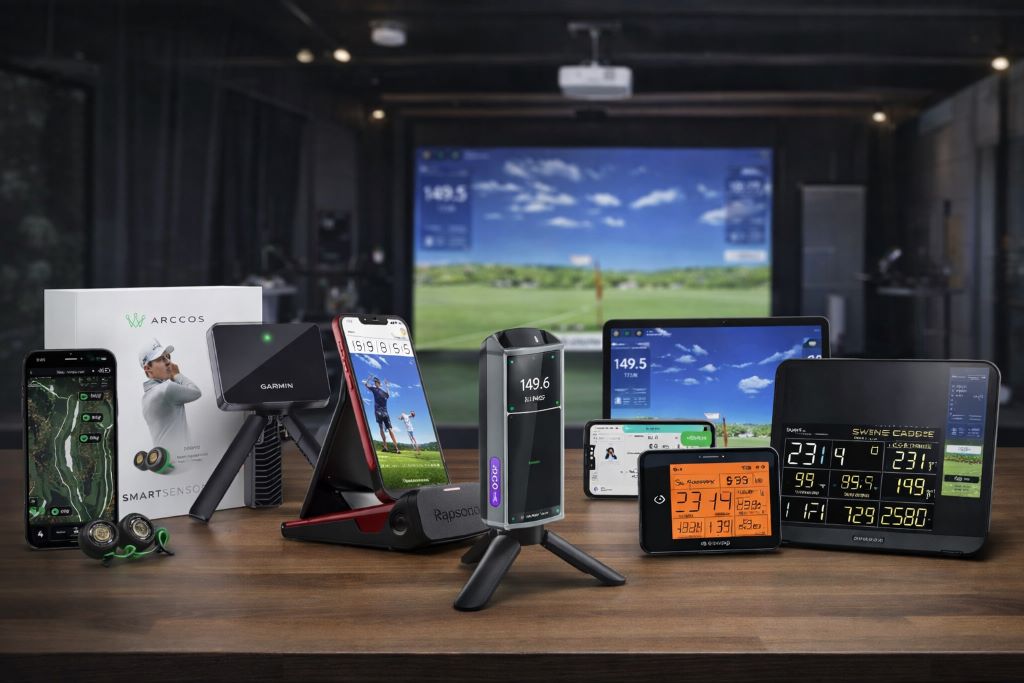
Outdoor launch monitors sit at the center of this shift. They translate ball speed, launch angle, distance, and other swing metrics into information golfers can actually use. The best models work reliably at the driving range, on the course, or even in a backyard practice setup.
This guide reviews the most reliable outdoor golf launch monitors currently available, focusing on how they perform in real use rather than marketing claims.
A Quick Overview of The Best Outdoor Golf Launch Monitor
The following golf launch monitors stood out for their balance of accuracy, usability, and practical outdoor performance.
- Rapsodo Mobile Launch Monitor
- Arccos Smart Sensors Gen 4
- Voice Caddie SC4 PRO
- Voice Caddie SC300i
- Garmin Approach R10
- PRGR Portable Launch Monitor
- Swinora Golf Launch Monitor
Best Outdoor Golf Launch Monitor of 2026
The best golf launch monitors vary widely in how they capture swing data. Some rely on radar, others use phone cameras, and a few combine sensors with GPS analytics. The models below represent the most practical tools for outdoor practice and real course feedback.
Rapsodo Mobile Launch Monitor
Phone powered shot tracking system
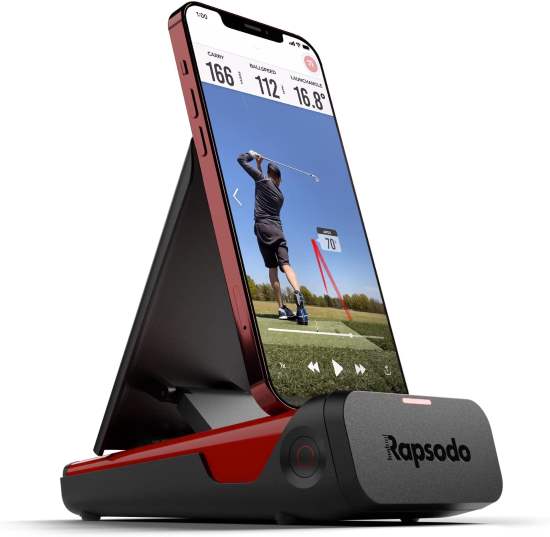
The Rapsodo Mobile Launch Monitor feels surprisingly polished for a device that depends on a phone or tablet for processing. You position the unit a short distance behind the ball while your iPhone or iPad records the swing through the camera. In practice, setup takes only a minute once you get used to alignment.
During outdoor use, the GPS satellite view stands out. It overlays ball flight on an actual aerial image of the range, which makes distance feedback easier to visualize. The unit performs best in open outdoor environments with good lighting. Indoor use works, but sunlight gives the tracking system more consistent accuracy.
The device itself is compact and fits easily into a small golf bag pocket. Maintenance mainly involves keeping the camera lens clean and ensuring the device sits level on the ground.
This system suits golfers who like video feedback and detailed swing review sessions. Players who prefer standalone devices without phone dependency may find the setup slightly limiting.
User Review – Michael H.
“I practice at a public range several times a week. Seeing my ball flight mapped onto the range view helped me understand my distance gaps quickly. It does require a stable phone setup though.”
Key Features
• Camera based shot tracking
Uses your phone camera to analyze ball flight which allows detailed swing video review immediately after each shot.
• GPS satellite range view
Shows shot paths on actual course or range maps so players understand distance in a real world context.
• Portable folding design
The compact frame folds flat which makes transport easy inside a golf bag or travel case.
• Video swing replay with metrics
Combines launch angle, ball speed, and shot distance with recorded swing footage for deeper analysis.
• Outdoor optimized tracking
Works best under natural lighting where the camera system can clearly track the ball.
Pros and Cons
| Pros | Cons |
| Excellent swing video feedback | Requires iPhone or iPad |
| Real range satellite mapping | Lighting affects tracking |
| Compact travel friendly design | Phone setup needed |
Arccos Smart Sensors Gen 4
AI powered game tracking system
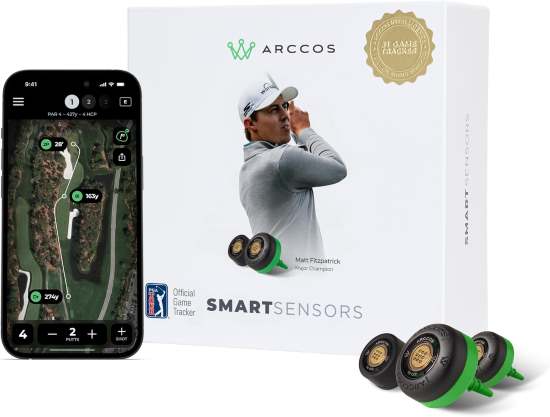
Arccos approaches launch monitoring from a different angle. Instead of measuring every shot from a stationary unit, it tracks real shots during actual rounds. Small sensors screw into the grip of each club and automatically record distance and performance data.
Outdoor play is where this system shines. As you move around the course, the sensors collect shot information while the mobile app calculates club distances and course strategy recommendations. Over time, the system builds a surprisingly detailed picture of your playing habits.
The sensors themselves are lightweight and require minimal attention once installed. Occasionally checking battery life and ensuring sensors stay tight on club grips is usually enough maintenance.
Arccos suits golfers who want real course performance insights rather than range focused swing metrics. Players looking for instant launch angle or spin measurements may prefer traditional radar based monitors.
User Review – Daniel K.
“I like that it tracks every shot during real rounds instead of just range practice. After a few rounds the app started recommending clubs for specific distances and it actually improved my decision making.”
Key Features
• Automatic shot detection
Sensors detect impact automatically which removes the need to manually log each shot during play.
• AI powered distance analysis
The system calculates average distances for every club using actual round data rather than isolated range shots.
• GPS rangefinder functionality
Provides course distance information directly in the app to assist with club selection.
• Club specific performance tracking
Highlights strengths and weaknesses in specific clubs which helps guide targeted practice.
• Lightweight grip mounted sensors
Small screw in sensors do not affect swing feel for most players.
Pros and Cons
| Pros | Cons |
| Tracks real course performance | No direct launch data |
| Automatic shot detection system | Requires phone connection |
| Detailed club distance analysis | Sensors need installation |
Voice Caddie SC4 PRO
Launch monitor with built in simulator
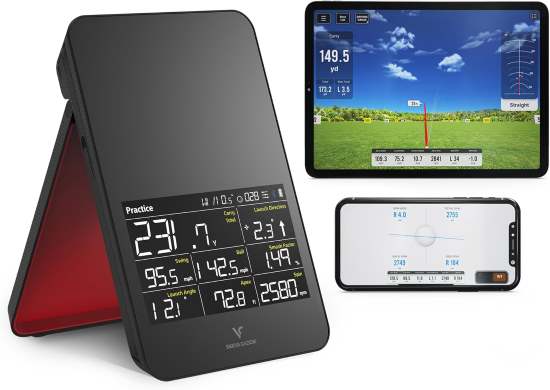
The Voice Caddie SC4 PRO blends radar measurement with a built in simulation environment. On a driving range it operates as a standard launch monitor, measuring ball speed, carry distance, launch angle, and other core metrics.
The device itself feels solid and slightly larger than pocket size units. Its built in screen means you can read data immediately without opening a phone app. That simplicity becomes valuable during outdoor practice when players want quick feedback between swings.
Where the SC4 PRO stands apart is its 3D driving range simulator. When connected to compatible software it allows simulated practice rounds, which makes the unit useful even when range access is limited.
Outdoor accuracy remains consistent as long as the device sits level behind the ball. Keeping the radar face clean and avoiding uneven surfaces helps maintain reliable readings.
User Review – Aaron L.
“I mainly use it at the driving range but the simulator mode surprised me. When the weather is bad I still practice swings at home and review my distances.”
Key Features
• Radar based swing measurement
Tracks ball flight using radar which provides reliable outdoor distance and speed data.
• Integrated LCD display
Shows shot information immediately so players do not depend entirely on a phone.
• 3D virtual range environment
Supports simulator style practice sessions that replicate real course conditions.
• Portable tripod compatible body
Can sit on the ground or attach to a small tripod for flexible positioning.
• Wide metric coverage
Includes ball speed, carry distance, swing speed, smash factor, and launch angle.
Pros and Cons
| Pros | Cons |
| Built in screen display | Slightly larger footprint |
| Radar based measurement system | Setup alignment important |
| Simulator compatible practice | App improves experience |
Voice Caddie SC300i
Portable radar swing analyzer
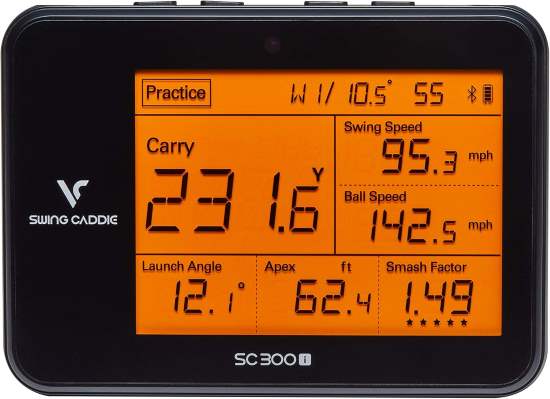
The SC300i focuses on simplicity. It measures core swing metrics without adding complex simulator environments or large app ecosystems. For many players that simplicity actually makes range practice smoother.
The device sits several feet behind the ball and uses radar to capture ball speed, carry distance, swing speed, and smash factor. A small screen displays each measurement instantly. Audio feedback also reads results aloud, which allows golfers to focus on the ball instead of staring at the screen.
In outdoor settings the radar tracking works consistently as long as the unit remains properly aligned. It performs particularly well on driving ranges where ball flight travels long enough for the radar to capture the full shot path.
Maintenance is minimal. Keeping the radar surface clean and occasionally charging the battery usually covers it.
User Review – Brian T.
“I wanted something simple that tells me if my swing speed and distance are improving. The voice feedback is surprisingly useful during practice sessions.”
Key Features
• Radar based shot tracking
Captures ball speed and distance with consistent outdoor reliability.
• Voice output feedback
Reads shot results aloud which helps maintain practice rhythm.
• Portable pocket friendly design
Small enough to carry easily in a golf bag.
• Practice mode statistics
Stores shot averages so players can review improvement across sessions.
• Battery powered outdoor operation
Designed for several hours of range practice on a single charge.
Pros and Cons
| Pros | Cons |
| Clear spoken shot feedback | Limited advanced metrics |
| Very simple setup process | Smaller display screen |
| Consistent outdoor distance tracking | No simulator environment |
Garmin Approach R10
Portable launch monitor with simulation
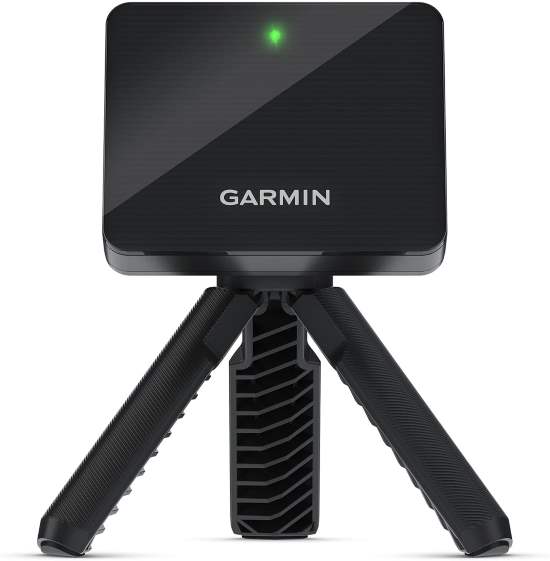
The Garmin Approach R10 combines radar measurement with a polished mobile app experience. The device itself is small enough to fit into a pocket, yet it captures a surprisingly broad set of swing metrics.
During outdoor practice the R10 measures ball speed, club head speed, carry distance, launch direction, and spin estimates. The companion app also provides simulated rounds on thousands of courses, which adds variety to training sessions.
Positioning matters with this monitor. It requires a consistent distance behind the ball and a level surface for reliable tracking. Once aligned properly, readings remain stable throughout long practice sessions.
The battery lasts long enough for extended driving range visits. Cleaning the radar sensor and protecting the device during transport helps maintain accuracy over time.
User Review – Kevin S.
“I like how small it is. I can take it to the range, practice yardages, then review the shot data later in the app.”
Key Features
• Compact radar tracking device
Small body size allows easy travel while still capturing multiple swing metrics.
• Virtual course simulation
Connects with golf simulation software to create interactive practice rounds.
• Extensive shot data tracking
Includes ball speed, carry distance, launch direction, and spin estimates.
• Long battery session capability
Designed for extended range practice without frequent charging.
• Mobile app data analysis
Stores swing sessions and provides visual shot charts for review.
Pros and Cons
| Pros | Cons |
| Very compact portable design | Requires careful positioning |
| Detailed mobile app analytics | Spin data estimated |
| Works indoors and outdoors | Phone required for full features |
PRGR Portable Golf Launch Monitor
Minimalist swing speed analyzer
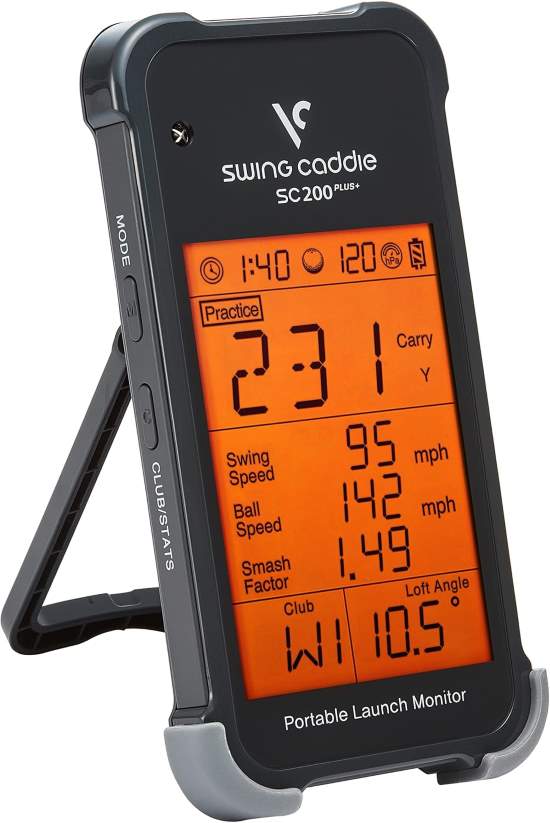
The PRGR launch monitor focuses almost entirely on swing speed and distance feedback. It lacks many of the advanced simulation features found in newer models, but that simplicity appeals to golfers who want a straightforward training tool.
You place the device behind the ball and swing as usual. The radar sensor captures club speed, ball speed, and estimated carry distance. Because the system measures swing motion rather than detailed ball flight, it works even during practice swings without a ball.
Outdoor use remains consistent across most driving ranges. The unit performs best when positioned on a flat surface with clear space behind the player.
Maintenance is simple. Replacing batteries occasionally and keeping the radar window clean keeps the monitor functioning smoothly.
User Review – Steven M.
“I bought it mainly to track swing speed during training. It gives instant feedback and helps me monitor progress during speed drills.”
Key Features
• Swing speed training feedback
Tracks club speed during real swings and practice swings which helps with speed development drills.
• Simple radar detection system
Captures essential swing data without complicated setup.
• Pocket sized training device
Small enough to carry during practice sessions without adding bulk.
• Quick start operation
No app or complicated pairing process required.
• Clear distance estimation display
Shows carry distance estimates alongside swing speed numbers.
Pros and Cons
| Pros | Cons |
| Extremely simple operation | Limited shot data |
| Tracks practice swing speed | No course simulation |
| Very compact training device | Basic distance estimates |
Swinora Golf Launch Monitor
Budget friendly swing analysis simulator
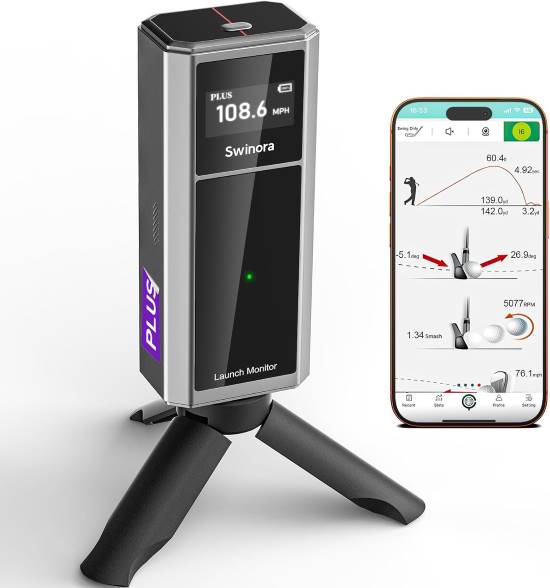
The Swinora launch monitor blends swing analysis with entry level simulation features. It targets golfers who want an affordable practice system that still offers visual shot feedback.
During outdoor use the device tracks core metrics like ball speed, swing speed, and launch angle. The companion software generates simulated ball flight graphics that help players visualize shot shape.
The unit feels lightweight and easy to transport. Setup usually involves placing the monitor behind the ball and connecting it to a mobile device. For consistent readings, aligning the unit carefully and avoiding uneven surfaces is important.
This monitor works best for casual practice sessions rather than high level swing diagnostics. Golfers seeking extremely precise spin or club path data may need more advanced radar systems.
User Review – Chris D.
“I use it mostly in my backyard hitting net. It gives enough information to understand my swing tendencies without being overly complicated.”
Key Features
• Real time swing data display
Provides immediate feedback on swing speed and ball flight characteristics.
• Virtual driving range graphics
Displays simulated shot paths that help visualize trajectory and distance.
• Portable practice device
Lightweight body makes transport easy between home practice and range sessions.
• Mobile device connectivity
Connects with smartphone apps for session recording and data storage.
• Beginner friendly interface
Simple controls make it accessible for new golfers learning launch monitor data.
Pros and Cons
| Pros | Cons |
| Affordable simulator style practice | Limited precision metrics |
| Easy beginner friendly setup | App required for visuals |
| Portable lightweight design | Not tour level accuracy |
Buying Guide
Choosing a launch monitor for outdoor practice involves more than comparing feature lists. The real difference between models often appears during everyday use at the driving range or on the course.
What Actually Matters Before Choosing
Core performance factors
Launch monitors measure swing data through radar, camera tracking, or club mounted sensors. Radar based models generally provide consistent outdoor distance measurements because they track the ball through open air. Camera based systems depend heavily on lighting conditions.
Many buyers assume all monitors deliver the same accuracy. In reality, tracking method determines how reliable the data will be during windy conditions, uneven surfaces, or limited ball flight distance.
Material quality and long term durability
Outdoor equipment experiences constant movement, impact risk, and exposure to dust or moisture. A sturdy housing and stable base reduce vibration during shots and protect internal sensors.
Buyers often overlook build quality when focusing on metrics. Over time, fragile units can lose calibration or suffer alignment problems after repeated transport.
Comfort and usability
Practice tools should not interrupt the natural rhythm of training. Devices that display results instantly allow golfers to focus on swing feel instead of checking a phone after every shot.
Complex setup processes often discourage consistent use. A monitor that requires frequent calibration may sit unused even if it offers advanced features.
Maintenance demands
Most launch monitors need occasional cleaning and battery charging. Radar based systems may require the sensor window to remain clear from dust or grass debris.
Buyers sometimes underestimate the importance of simple maintenance routines. Small habits such as storing the monitor in a protective case help preserve accuracy over time.
Environmental compatibility
Outdoor conditions vary widely. Bright sunlight benefits camera based tracking systems, while radar monitors work better when the ball travels a reasonable distance.
Golfers practicing in tight backyard spaces should confirm that the monitor can measure shorter ball flights accurately.
Safety considerations
Launch monitors sit close to active hitting areas. Stable placement prevents accidental tipping or impact damage. Devices positioned several feet behind the ball reduce the risk of stray contact.
Players sometimes forget that equipment stability matters as much as measurement accuracy.
Common Buyer Mistakes
Many golfers assume more metrics automatically improve training. In reality, most players focus primarily on distance, swing speed, and launch angle. Large data sets can become distracting rather than helpful.
Another common mistake involves ignoring setup requirements. Some radar monitors require specific spacing behind the ball. Buyers who practice in small areas often discover these limitations after purchase.
Many people also expect simulator graphics to match professional indoor installations. Portable launch monitors simulate ball flight effectively, but they rarely replicate the precision of full studio systems.
A frequent misunderstanding involves spin measurement. Some portable monitors estimate spin rather than directly measuring it. While estimates work for general practice, they may not satisfy golfers seeking club fitting level accuracy.
Another mistake appears when golfers choose monitors designed primarily for indoor nets but attempt to use them outdoors at the range. Environmental conditions can affect sensors differently depending on their design.
Finally, buyers sometimes prioritize extreme portability over stability. Ultra compact monitors may shift position during use if placed on uneven ground.
Related:
Best Affordable Golf Practice Mats 2026: Simulator, Chipping & All-Weather Picks
How to Set Up Your Perfect Home Golf Practice Space
How to Match Products to Specific Needs
Casual golfers who practice occasionally often prefer simple devices like swing speed monitors. These tools deliver quick feedback without requiring complex setup or long analysis sessions.
Frequent practice players benefit from radar based monitors that track detailed shot metrics across hundreds of swings. Consistent distance feedback helps refine yardage gaps between clubs.
Golfers practicing in small spaces such as backyard nets should verify that the monitor can capture data from short ball flights. Some radar systems need longer travel distance for accurate readings.
Players focused on course strategy rather than swing mechanics may prefer tracking systems that analyze actual rounds. These tools build long term performance data across many holes and playing conditions.
Advanced players or serious hobbyists often value simulation compatibility. Virtual course environments allow practice during poor weather while still producing measurable swing data.
Choosing the right launch monitor ultimately depends on how and where you practice most often.
Conclusion
Outdoor golf launch monitors have become valuable training tools for golfers at every skill level. They turn practice swings into measurable information that helps players understand distance, speed, and shot consistency.
Some devices emphasize swing metrics and radar tracking. Others focus on course analytics or simulation experiences. Each approach serves a different type of golfer.
The best golf launch monitor depends on your practice environment, how often you train, and whether you prefer simple distance feedback or detailed swing analysis. Understanding these differences makes it easier to select a monitor that supports steady improvement.
FAQs
Do outdoor launch monitors work at any driving range
Most models work well at standard driving ranges as long as there is enough space for ball flight tracking.
How accurate are portable golf launch monitors
Many modern units provide reliable distance and speed estimates suitable for everyday practice.
Can launch monitors track practice swings without a ball
Some radar based models measure swing speed even during practice swings.
Do launch monitors require a smartphone
Several devices operate independently, but many use mobile apps for deeper analysis.
Can launch monitors help improve golf distance
Yes, consistent feedback on swing speed and launch angle helps golfers refine distance control.