BETAFPV Cetus Pro FPV Kit: Is Simulator Practice Worth It?
Key Takeaways
- The BETAFPV Cetus Pro FPV Kit bundles a brushless whoop drone, transmitter, and goggles.
- Normal, Sport, and Manual modes let beginners progress from hover to freestyle.
- Altitude hold in Normal mode keeps the drone steady indoors for new pilots.
- Self-protection triggers an emergency landing on signal loss, low battery, or collision.
- Turtle mode flips the drone upright after a crash without a walk across the field.
Most beginner FPV drones ship as bare frames that crash on the first flight. Toy drones hover fine but lack the power for real freestyle moves. Full FPV builds cost hundreds and need weeks of simulator practice before takeoff. The BETAFPV Cetus Pro FPV Kit aims to close that gap with a ready-to-fly whoop.
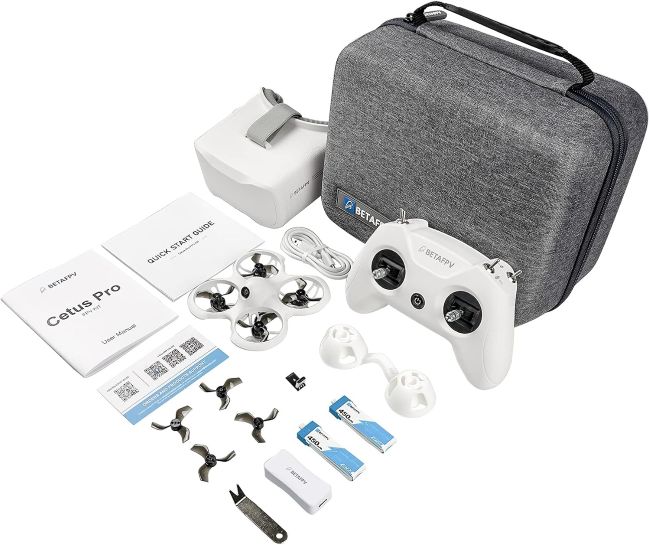
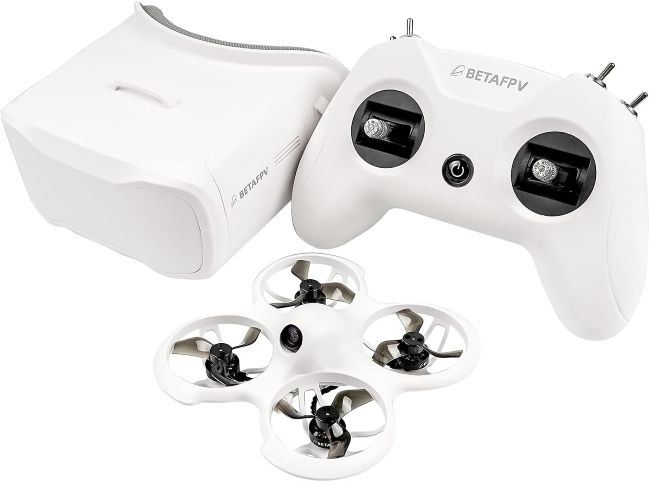
This kit pairs the brushless Cetus Pro quadcopter with a LiteRadio 2 SE transmitter and VR02 goggles. Three flight modes and altitude hold ease new pilots into FPV control. Self-protection and Turtle mode add safety that raw FPV builds skip. Let’s see whether this kit earns a spot in your gear bag.
BETAFPV Cetus Pro FPV Kit
| Feature | Detail |
|---|---|
| Brand | BETAFPV |
| Model | Cetus Pro FPV Kit |
| Drone Type | Brushless whoop |
| Color | White |
| Video Resolution | 1200TVL analog |
| Transmitter | LiteRadio 2 SE (Frsky D8) |
| Goggles | VR02 FPV |
| Flight Modes | Normal, Sport, Manual |
| Speeds | Slow, Mid, Fast per mode |
| Altitude Hold | Normal mode only |
| Batteries | 2 x BT2.0 450mAh 1S LiPo |
| Charger | BT2.0 charger and voltage tester |
| Connectivity | USB |
| Extras | Prop removal tool, 4 x 40mm 3-blade props, screwdriver, storage bag |
| Skill Level | Beginner |
Detailed Review
Why This Product Stands Out
Most beginner FPV drones force you to buy the transmitter and goggles separately. The BETAFPV Cetus Pro FPV Kit takes a more complete approach. The box ships with the drone, LiteRadio 2 SE transmitter, and VR02 goggles in one package. That completeness matters because matching FPV gear across brands costs time and money.
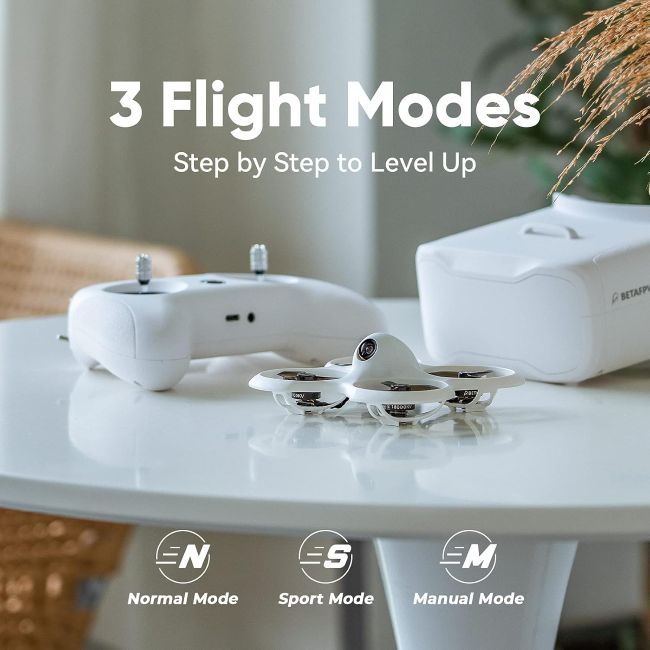
The kit also stands out through its three flight modes. Normal mode adds altitude hold for steady indoor hover practice. Sport mode unlocks more power for outdoor flight without full manual control. Manual mode drops all assistance for real acro freestyle flying. You get a kit that grows with you from your first hover to your first flip.
Key Specifications
| Specification | Value |
|---|---|
| Drone Type | Brushless whoop |
| Color | White |
| Video | 1200TVL analog |
| Transmitter | LiteRadio 2 SE, Frsky D8 |
| Goggles | VR02 FPV |
| Flight Modes | Normal, Sport, Manual |
| Speeds | Slow, Mid, Fast |
| Altitude Hold | Normal mode |
| Batteries | 2 x BT2.0 450mAh 1S LiPo |
| Charger | BT2.0 with voltage tester |
| Props | 40mm 3-blade, 4 spare |
| Protocol | Frsky D8 |
Design & Build Quality
The Cetus Pro follows a compact whoop airframe design with blade guards. The guarded props make the drone safe for indoor flight near walls and furniture. That safety matters because FPV beginners crash often in the first hours. The white frame stays visible against dark floors and outdoor grass.
Build quality reflects the beginner-friendly intent. The brushless motors deliver more power and durability than brushed alternatives on toy drones. The frame feels rigid despite the lightweight whoop design. The prop guards wrap each rotor for safe indoor and backyard flights. Every detail serves the goal of a durable, crash-tolerant FPV trainer.
Materials & Construction
Material choice drives the durability and safety of the Cetus Pro. Lightweight composites form the whoop frame for strength without added grams. The brushless motors mount firmly to the arms for efficient, quiet thrust. Blade guards wrap the props to protect walls, furniture, and the drone itself.
The BT2.0 battery connector locks the 1S LiPo pack in place during flight. That connector type beats older PH2.0 plugs, which sag under load. Spare props and a removal tool ship in the box for quick field repairs. The construction focuses on crash survival and fast fixes for new pilots.
Performance
Drone performance shows up in flight time, power delivery, and mode flexibility. The brushless motors deliver strong thrust for fast outdoor flight and freestyle moves. The 1200TVL analog camera feeds clear video to the VR02 goggles. That feed matters because FPV pilots rely on the goggles, not line of sight.
Two 450mAh 1S batteries deliver short but typical whoop flight times per charge. You swap packs between sessions to keep flying without a long wait. Normal mode holds altitude steady for indoor hover practice. Sport mode adds speed for outdoor flight, and Manual mode unlocks full acro control. These modes suit raw beginners through advancing freestyle pilots.
Comfort / Usability
Usability separates a kit you fly from one that sits in a drawer. The LiteRadio 2 SE transmitter fits most hands and runs in Mode 2 by default. That setup matters because Mode 2 is the standard FPV stick layout. The VR02 goggles display a clear analog feed without complex setup.
Altitude hold in Normal mode keeps the drone steady when you let go of the sticks. That feature lets new pilots focus on orientation before they learn manual hover. Self-protection triggers an emergency landing on signal loss or low battery. Turtle mode flips the drone upright after a crash without a walk across the field. The kit supports FPV simulator practice through USB, so you build skills before you fly.
Features Explained
Every feature on the BETAFPV Cetus Pro FPV Kit serves a practical purpose. Here is why each one matters in daily use.
| Feature | Benefit |
|---|---|
| Brushless whoop frame | Provides more power and durability for faster flying, racing, and freestyle practice |
| 3 flight modes (N/S/M) | Lets pilots progress from stable hovering to full acro control |
| 3 speeds per mode | Provides adjustable flight speed for different skill levels |
| Altitude hold in N mode | Maintains a steady height, making beginner flight practice easier |
| Self-protection function | Initiates an emergency landing after signal loss or low battery |
| Auto-disarm on collision | Stops the motors after a strong impact to help prevent propeller and motor damage |
| Turtle mode | Flips the drone upright after a crash without manually retrieving it |
| LiteRadio 2 SE transmitter | Provides a dedicated FPV radio with FrSky D8 protocol and Mode 2 controls |
| VR02 FPV goggles | Provides a clear 1200TVL analog video feed for immersive FPV flying |
| 2 × BT2.0 450mAh batteries | Provides spare power packs for longer flying sessions |
| BT2.0 charger and voltage tester | Allows convenient battery charging and charge-level monitoring |
| FPV simulator support | Enables USB-connected practice on a PC before flying the drone |
Real World Usage
Picture your first FPV session in a living room. You power on the Cetus Pro in Normal mode and take off. Altitude hold keeps the drone steady as you learn the stick layout. The VR02 goggles show a clear feed from the 1200TVL camera. Self-protection lands the drone safe if you lose signal or cut the throttle.
Now imagine a backyard session a few weeks later. You switch to Sport mode and fly faster around the yard. Turtle mode flips the drone upright after a flip-out crash without a long walk. Swap to the second battery and keep practicing without a recharge break. The storage bag holds the whole kit for a trip to the park.
Benefits
- A complete kit bundles the drone, transmitter, and goggles in one box.
- Three flight modes let you progress from hover practice to freestyle.
- Altitude hold in Normal mode steadies the drone for indoor beginner flight.
- Self-protection triggers an emergency landing on signal loss or low battery.
- Turtle mode flips the drone upright after a crash without a rescue walk.
- Brushless motors deliver more power and durability than brushed toy drones.
- FPV simulator support lets you build stick skills before you fly.
- A storage bag and spare props keep the kit ready for travel and quick fixes.
Limitations
- The 450mAh 1S batteries deliver short flight times of a few minutes per pack.
- The 1200TVL analog camera trails digital FPV systems for image clarity.
- The kit lacks GPS, so it cannot auto-return to a takeoff point.
- Manual mode drops all assistance, which can crash the drone fast for new pilots.
- The Frsky D8 protocol may not pair with newer receivers on other drones.
Who Should Buy It?
This kit suits beginners who want a complete, ready-to-fly FPV starter set. Indoor pilots value the blade guards and altitude hold for safe living room practice. Aspiring freestyle pilots appreciate the three modes that grow with their skill. Anyone who wants to try FPV without a full build will find the kit useful.
If you want a brushless whoop kit that takes you from zero to freestyle, the Cetus Pro fits. The bundled transmitter and goggles save you from matching gear across brands. The simulator support lets you practice before you risk the drone. The self-protection and Turtle mode add safety that raw FPV builds skip.
Who Should Avoid It?
Avoid this kit if you want long flight times per battery. The 450mAh 1S packs deliver short sessions typical of whoop drones. Skip it if you need a GPS camera drone for photos and video. The Cetus Pro is an FPV trainer, not a photography drone.
If you want a digital HD FPV feed, look at higher-end kits with DJI or HDZero gear. The 1200TVL analog system works for practice but lacks the clarity of digital. Anyone who flies long-range outdoor missions should pick a larger FPV drone with GPS.
Key Features Table
| Feature | Why It Matters |
|---|---|
| Brushless whoop frame | Delivers power and durability for freestyle |
| 3 flight modes (N/S/M) | Let you progress from hover to acro |
| 3 speeds per mode | Give fine control as your skills grow |
| Altitude hold in N mode | Steadies the drone for indoor beginner flight |
| Self-protection function | Lands safe on signal loss or low battery |
| Auto-disarm on collision | Prevents prop and motor damage on impact |
| Turtle mode | Flips the drone upright after a crash |
| LiteRadio 2 SE | Works with the drone and a simulator |
| VR02 FPV goggles | Show a clear analog feed for FPV flight |
| 2 x BT2.0 450mAh batteries | Let you swap and keep flying |
| FPV simulator support | Lets you build skills before you fly |
Pros & Cons Table
| Pros | Cons |
|---|---|
| Complete kit with drone, radio, and goggles | Short flight times per 1S battery |
| Brushless power for freestyle | Analog camera trails digital FPV |
| 3 modes grow with your skill | No GPS for auto-return |
| Altitude hold for indoor practice | Manual mode can crash new pilots fast |
| Turtle mode saves rescue walks | Frsky D8 may not pair with newer gear |
| Simulator support builds skills | Not a photography drone |
Cleaning Tips
Use a soft brush to clear dust and grass from the prop guards after each session. Avoid water, since moisture can seep into the motors and camera housing. Wipe the VR02 goggles lens with a dry microfiber cloth to keep the view clear. Brush dirt from the frame with a small, dry camera brush. Store the kit in the included bag to keep dust off the motors and electronics.
Maintenance Tips
Inspect the props for nicks and cracks before each flight session. Swap damaged props using the spare set and removal tool included in the box. Store the LiPo batteries at storage voltage if you plan a long pause between flights. Use the voltage tester to check each pack before you fly. Keep the kit in the storage bag in a cool, dry place away from direct sun. Charge the batteries only with the included BT2.0 charger to avoid damage.
Troubleshooting Tips
Drone Will Not Arm
The Cetus Pro will not arm if the throttle stick sits above zero. Pull the throttle stick to the lowest position before you arm. Confirm the flight mode sits in Normal before your first flight.
Goggles Show Static Or No Feed
The analog video feed can drop when the channel mismatches the drone. Match the channel on the VR02 goggles to the drone camera channel. Check the cable from the goggles to the antenna for a firm seat.
Drone Flips Upside Down On Crash
A crash can land the drone upside down on the ground. Activate Turtle mode on the transmitter to spin the props in reverse. The drone flips upright so you can take off again without a walk.
Battery Drains In Under Two Minutes
Cold weather and full-throttle flight cut 1S LiPo run time fast. Warm the battery in your pocket before you fly. Land before the voltage drops below 3.3V to protect the pack.
Drone Drifts In Normal Mode
The barometer and laser sensor need a clean surface to hold altitude steady. Wipe the sensor on the drone underside with a dry cloth. Recalibrate the drone on a flat surface before the next flight.
What Real Buyers Appreciate
Buyers often praise the complete kit for saving them from matching FPV gear across brands. Many appreciate the altitude hold that steadies the drone for indoor beginner practice. New pilots value the three flight modes that grow with their skill. Several note the Turtle mode saves long walks after a crash in a field. Freestyle learners highlight the brushless power for flips and fast outdoor flight. Some wish the batteries lasted longer, but most find the two-pack swap convenient.
Frequently Asked Questions
What comes included in the BETAFPV Cetus Pro FPV Kit?
The kit bundles the Cetus Pro brushless quadcopter, LiteRadio 2 SE transmitter, and VR02 FPV goggles. You also get two BT2.0 450mAh batteries, a charger and voltage tester, and spare props. A storage bag, screwdriver, and USB cables round out the package.
Does the BETAFPV Cetus Pro FPV Kit support simulator practice?
The LiteRadio 2 SE transmitter connects to a PC through USB. You can practice FPV stick skills in a simulator before you fly the drone. That practice helps new pilots build muscle memory without crash risk.
What flight modes does the Cetus Pro offer?
The drone offers Normal, Sport, and Manual modes. Normal adds altitude hold for steady indoor hover. Sport unlocks more speed for outdoor flight. Manual drops all assistance for full acro freestyle control.
How does the self-protection function work?
The drone makes an emergency landing when it loses signal or runs low on battery. It also auto-disarms and drops to the ground after a strong collision. Those features prevent fly-aways and motor burnout from stuck rotors.
What is Turtle mode on the Cetus Pro?
Turtle mode spins the props in reverse to flip the drone upright after a crash. You activate it from the transmitter without a walk across the field. That feature saves time and effort after a flip-out crash.
How long does each battery last on the Cetus Pro?
The 450mAh 1S LiPo batteries deliver short flight times typical of whoop drones. Each pack runs a few minutes depending on your flight mode and throttle use. The kit includes two batteries so you can swap and keep flying.
Can I fly the BETAFPV Cetus Pro FPV Kit outdoors?
Sport and Manual modes unlock enough power for outdoor flight in calm conditions. The brushless motors handle light wind better than brushed toy drones. Avoid strong gusts, since the whoop frame is light and lacks GPS.
Final Verdict
The BETAFPV Cetus Pro FPV Kit earns its place as a complete, beginner-friendly FPV starter set. The brushless whoop frame delivers power for fast flight and freestyle moves. Three flight modes take you from steady indoor hover to full acro control. Altitude hold, self-protection, and Turtle mode add safety that raw FPV builds skip. If you’re also exploring other types of outdoor technology, Best Golf GPS Devices and Rangefinders can help you compare tools designed to improve accuracy and course awareness. The bundled transmitter and goggles save you from matching gear across brands.
This kit does not target long flight times or GPS camera drone features. It focuses on FPV skill building from zero to freestyle. For anyone who wants a ready-to-fly FPV trainer with simulator support, the BETAFPV Cetus Pro FPV Kit belongs on your short list.
Call To Action
Ready to start your FPV journey with a complete, beginner-friendly kit? The BETAFPV Cetus Pro FPV Kit brings the Cetus Pro drone, LiteRadio 2 SE, VR02 goggles, two batteries, and a storage bag to your first session. Power on in Normal mode, practice in a simulator, and flip into Turtle mode after a crash. Your best FPV training starts here.